Bring Your Web Designs to Life with the Septhia Typeface
I was working on a boutique website for a small handmade jewelry brand when I first came across Septhia. The client wanted something that felt both elegant and approachable, and as I tested fonts in the hero section, Septhia stood out immediately. It had that perfect balance of charm and professionalism—just what the brand needed to feel inviting yet trustworthy.
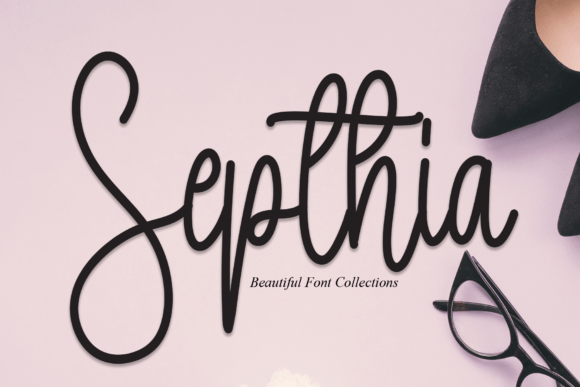
Septhia is a lovely and adorable script font with beautiful, well-balanced characters. Its curves are soft but deliberate, giving it a sense of grace without feeling overly ornate. This makes it ideal for digital projects where you want to convey warmth and creativity without sacrificing readability. As a web designer, I've found it particularly useful for headers, call-to-action buttons, and promotional banners.
Elegant Display for Hero Sections and Headlines
One of the first places I used Septhia was in the hero section of the jewelry site. Placed over a subtle background image of delicate necklaces, the font added just the right amount of visual interest. It didn’t overpower the design but instead drew attention to the headline, making it more engaging for visitors.
When testing it on mobile, I noticed how well it scaled. Even on smaller screens, the characters remained legible and maintained their charm. That’s a big plus for responsive layouts where typography needs to adapt without losing its character.
For landing pages or product pages, Septhia works beautifully as a display font for titles or feature highlights. It adds personality to sections like “Featured Collection” or “New Arrivals,” helping to guide the user’s eye through the content naturally.
Pairing Septhia with Complementary Fonts
As with any decorative font, pairing Septhia with a clean, readable body font is essential. I often pair it with a simple sans serif like Montserrat or Lato for body copy. This combination allows the script font to shine in headings while keeping the rest of the text easy to read.
For a more editorial look, a classic serif font like Merriweather can be a great match. It gives the site a polished feel, which is especially useful for blog posts or about pages where the tone needs to be more professional.
When using Septhia for buttons or short phrases, I recommend keeping the contrast high. A dark text color on a light background or vice versa ensures that the font remains visible and clickable. It's also important to consider the size—while the font is elegant, it shouldn't be too small for interactive elements like CTA buttons.
Using Septhia Across Different Web Elements
Septhia isn’t limited to just headlines. I’ve used it in several other areas of the website, including navigation menus for special collections and in the footer for social media links. In these cases, I made sure to use it sparingly to avoid overwhelming the layout.
On the product pages, I experimented with using Septhia for feature tags such as “Handcrafted,” “Ethically Made,” or “Limited Edition.” These short phrases benefited from the font’s decorative style, adding a touch of elegance to each listing.
Another creative use was in the email newsletter header. Septhia gave the emails a personal and friendly feel, which aligned perfectly with the brand’s voice. It helped create a connection with subscribers, making the content feel more authentic and handcrafted.
Considerations for Web Use
While Septhia is a fantastic display font, it’s not suitable for long paragraphs or dense blocks of text. Its decorative nature makes it less ideal for body copy, where clarity and readability are crucial. For this reason, I always reserve it for headlines, subheadings, and accents rather than using it throughout the entire page.
Before implementing it on a live site, it's important to check the font’s availability in web formats like WOFF or WOFF2. Ensuring that it loads quickly is key to maintaining good performance, especially for sites targeting a global audience. Also, verifying the commercial license is essential if you're planning to use it on client projects or an online store.
Lastly, I always test the font across different devices and browsers to ensure consistency. While Septhia looks amazing on desktops, it should also render smoothly on tablets and smartphones. This helps maintain a seamless user experience no matter how someone accesses your site.
Overall, Septhia has become one of my go-to fonts for web projects that need a touch of elegance and charm. Whether it's for a boutique site, a coaching platform, or a portfolio homepage, it brings a sense of personality that elevates the overall design. If you're looking for a script font that feels both stylish and functional, I highly recommend giving Septhia a try.